
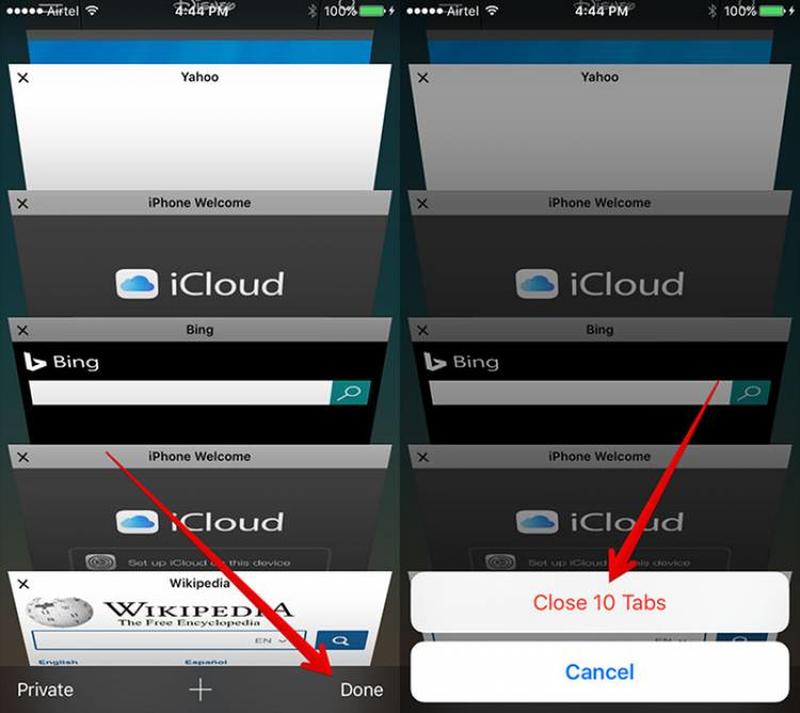
We can't count the number of times we've tried to go back to a tab we thought we left open, only to realize everything is now gone. Instead of digging around in 'history' for the link to those shoes that you were totally going to buy, there's a much easier way to restore everything back to normal. Open up your tabs menu by pressing the button in the bottom right corner, then press and hold the '+' button to open recently closed tabs.
If you want to do the reverse, i.e. close all of your tabs at once, there's a way to do this, too. In the same tab view, simply press 'done' and you'll have the option to close everything. It comes in handy if you don't want someone to see what you've been looking at!
Over the years, weve seen so many food trends come and go, such as ramen burgers, matcha, and spiked ice-cream. Nowadays, were seeing another trend making waves in the food industry. How many times today have you seen an Instagram photo of a scoop of black ice cream, or a cup of black yogurt, or hamburgers with black buns? Indeed, the charcoal trend has taken the world by storm.
So, what gives your latte that deep black shade? Activated charcoal, or coconut ash, is produced by heating coconut shells to insanely high temperatures until theyre burnt to a crisp. The ashes are then increased in size by steaming at high temperatures. Through this process, the ashes become a strong detoxifier, mostly because they become extra absorbent. This product may be purchased in pill form, and promises to alleviate hangovers, minimize the effects of food poisoning, and fight the visible signs of aging.
Activated charcoal is said to boost ones energy as a result of decreasing toxins in the body. However, no evidence proves that detoxifying can lead to increased energy. Also, while it can help cure a hangover, it doesnt necessarily remove alcohol from your blood. It is also said to aid in debloating your stomach because it cleanses your colon but again, this all anecdotal and isnt supported by scientific evidence as of yet. All we can say for sure is that it is a proven detoxifier.